
Introduction to PyTorch#
Introduction#
In this section we will cover the following topics:
What is a deep learning, and when do we use it.
What is a tensor, and how can we represent data with them.
How can we transform a tensor to fit our needs.
import torch
import torchvision
import matplotlib.pyplot as plt
import numpy as np
from torchvision import transforms
np.random.seed(42)  # for reproducibility
What is Deep Learning#
Machine learning is turning things (data) into numbers and finding patterns in those numbers.
Deep learning is a subset of machine learning using neural networks to analyze complex relationships in the data.
Models can learn patterns through it’s
Deep learning requires extensive amounts of data before it can be useful
What deep learning is good for#
Problems with long lists of rules— when the traditional approach fails, machine learning/deep learning may help.
Continually changing environments— deep learning can adapt (‘learn’) to new scenarios.
Discovering insights within large collections of data— when the dataset is too big, it might be better to use a deep learning model instead of observing the entire data.
What deep learning is (typically) not good for#
“If you can build a simple rule-based system that doesn’t require machine learning, do that.” - Rules of Machine Learning
When you need explainability- the patterns learned by a deep learning model are typically uninterpretable by a human.
When errors are unacceptable— since the outputs of deep learning model aren’t always predictable.
When you don’t have much data— deep learning models usually require a fairly large amount of data to produce great results.
What is a neural network#
A neural network takes in numerical values (often times in the form of a tensor)
It learns the representation (adjusts weights/learn features/patterns)
Produces an output tensor that is Human Interpretable

What is PyTorch#
Most popular research deep learning framework
Write fast deep learning code in Python (able to run natively on many GPUs)
Able to access many pre-built deep learning models TorchHub/torchvision.models
What is a Tensor#
A Tensor is the basic building block. Similar to NumPy’s ndarrays, with the addition being that Tensors can also be used on a GPU.
x = torch.tensor([5.0, 3, 6.6, 1])
They have NumPy-like behaviour for array operations - not a regular Python list.
x + 1
tensor([6.0000, 4.0000, 7.6000, 2.0000])
PyTorch tensors can be on your CPU or GPU. You can explicitly copy it back and forth. We will look into this more later.
Gradients#
PyTorch tensors are more powerful than NumPy ndarrays when we are interested in propagating gradients.
Neural networks are trained via two operations:
a forward pass
a backward pass
Both the gradient, and forward and backward pass functions are attached to PyTorch’s Tensor object.
Setting require_grad=True makes PyTorch track all the operations on that Tensor. When you finish the computation, you can call .backward() on it and the gradients are stored in the .grad attribute.
x = torch.tensor([4.0, 5.0, 6.0], requires_grad=True)
x
tensor([4., 5., 6.], requires_grad=True)
x = x + 4
x
tensor([ 8., 9., 10.], grad_fn=<AddBackward0>)
If you don’t want to track gradients, you can put code inside a with torch.no_grad() block. This saves memory.
with torch.no_grad():
    x = x * 2
x
tensor([16., 18., 20.])
Datasets#
We will only cover this briefly, as this code will be provided for you. It is helpful to know generally how it works.
Transforms are common image transformations which can be chained together using Compose().
List of common transforms
transform = transforms.Compose([
    transforms.ToTensor(),
    transforms.Normalize((0.5,), (0.5,))
])
Certain commonly-used public datasets are available directly via PyTorch, through torchvision.datasets.
Listing of all available datasets here: https://pytorch.org/docs/stable/torchvision/datasets.html
train_set = torchvision.datasets.MNIST(
    root='./data',
    train=True,
    download=True,
    transform=transform
)

test_set = torchvision.datasets.MNIST(
    root='./data',
    train=False,
    download=True,
    transform=transform
)
Data loaders are provided by torch.utils.data and help for easy iteration over datasets.
https://pytorch.org/tutorials/beginner/data_loading_tutorial.html
train_loader = torch.utils.data.DataLoader(
    train_set,
    batch_size=16,
    shuffle=True,
    num_workers=2
)


test_loader = torch.utils.data.DataLoader(
    test_set,
    batch_size=24, # Forward pass only so batch size can be larger
    shuffle=False,
    num_workers=2
)

classes = np.arange(0, 10)
To iterate over the test set, one batch at a time, we do the following:
# 24 images at a time
for i, data in enumerate(test_loader, 0):
    images, labels = data
    print("Batch", i, "size:", len(images))

    break # Do something
Batch 0 size: 24
Note that the length of a loader is the number of batches, not the total number of images.
len(test_loader)
417
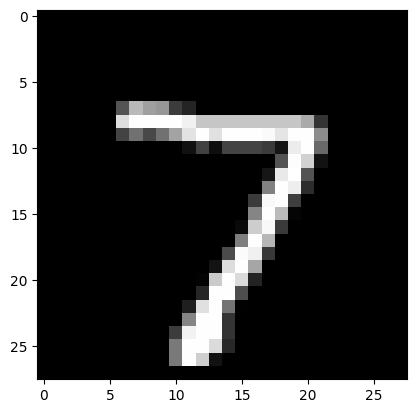
If you want to look at the images in the set one by one, you can define a loader with batch_size of 1 and iterate over it using an iterator.
visual_loader = torch.utils.data.DataLoader(
    test_set,
    batch_size=1,
    shuffle=False,
)

iterator = iter(visual_loader)
image, label = next(iterator)
plt.imshow(image.flatten().reshape(28, 28), cmap='gray')
print(label)
tensor([7])
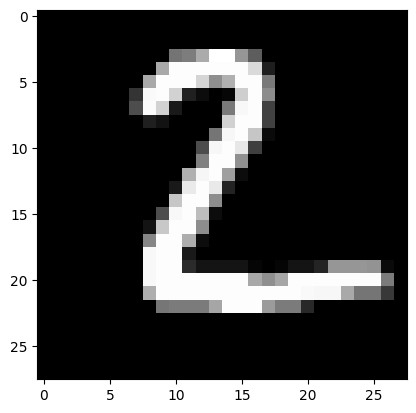
image, label = next(iterator)
plt.imshow(image.flatten().reshape(28, 28), cmap='gray')
print(label)
tensor([2])
Exercise:#
Create two tensor that holds 5 values with
requires_grad=True. Multiply them together and check what thegrad_fnis.Using the
visual_loader, display a handwritten4.