Lecture 3 - (05/02/2026)
Today’s Topics:
Lambda functions
Data Representation and Pandas
Loss Functions
Lambda functions
Lambda expressions are “small anonymous functions”
Mainly used for small and temporary tasks.
Very common for
apply()(andmap()&reduce()).They can be stored as a variable and used as a function
f = lambda x : x**2
f(4), f(6), f(8), f(10)
(16, 36, 64, 100)pairs = [('Alice', 94), ('Bob', 87), ('Charlie', 78), ('David', 88), ('Emily', 83)]
pairs.sort(key = lambda pair : pair[1])
pairs[('Charlie', 78), ('Emily', 83), ('Bob', 87), ('David', 88), ('Alice', 94)]Example: create a new column that is true a pokemon has two types
import pandas as pd
df = pd.read_csv("https://gist.githubusercontent.com/armgilles/194bcff35001e7eb53a2a8b441e8b2c6/raw/92200bc0a673d5ce2110aaad4544ed6c4010f687/pokemon.csv")
df.head()df = df.assign(two_type_boolean = lambda row : (row["Type 2"].notna()))
df.head()Pandas
We will use the popular Python Data Analysis Library (Pandas).
Open source and freely available, in collab & most distributions.
Pandas documentation: Getting Started
Reading and Writing to CSV’s
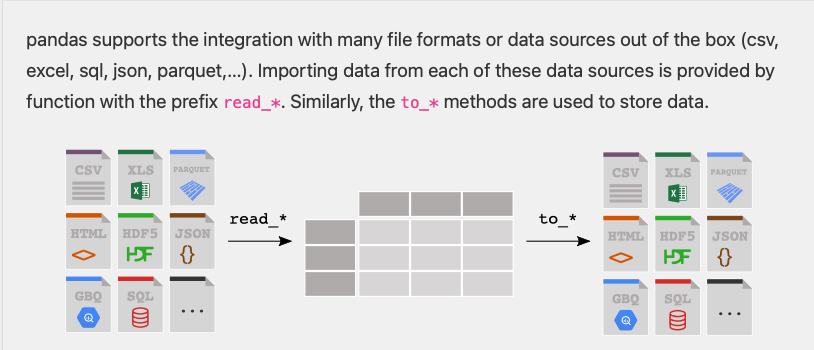
import pandas as pd
df = pd.read_csv('infile.csv')
pass
pass
pass
df.to_csv('outfile.csv', index=False)
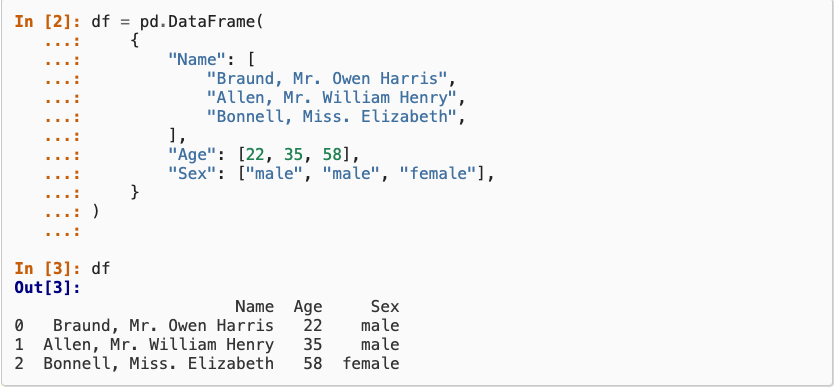
Constructing from a dictionary:
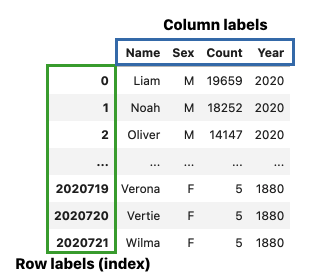
Selecting by label
baby = pd.read_csv("https://raw.githubusercontent.com/jsvine/babynames/refs/heads/master/data/name-counts.csv")
baby.head()# The first arguement is the row label
# \/
baby.loc[1, 'name']
# /\
# The second arguement is the column label'Anna'Selects the entry in row 1, column “name” which is ‘Anna’
We can also select a range of values
baby.loc[1:3, 'name':'count'] # is inclusive!# Just extract the name and count columns
baby.loc[:, ['name', 'count']]
# list of column labelsWhat happens if you use single versus double brackets?
# Shorthand for baby.loc[:, 'name']
type(baby['name']), baby['name']
(pandas.Series,
0 Mary
1 Anna
2 Emma
3 Elizabeth
4 Minnie
...
1758725 Zylin
1758726 Zymari
1758727 Zyrin
1758728 Zyrus
1758729 Zytaevius
Name: name, Length: 1758730, dtype: str)Returns a series (pandas equivalent to a list/vector) and not a entire dataframe
Boolean Selection
We can build more complex selections using Boolean selection
Create a Series of Booleans that selects rows where the Series is True:
baby.loc[baby['year'] == 2000, :]
# baby.loc[baby['year'] == 2000] also works herebaby.loc[baby['count'] == 5]Modeling and Estimation
Essentially, all models are wrong, but some are useful. - George Box, Statistician (1919-2013)
A model is an idealized representation of a system.
Example: weather forecasts make predictions that are often (in)correct but sometimes not.
url = "https://raw.githubusercontent.com/mwaskom/seaborn-data/master/tips.csv"
tips = pd.read_csv(url)
Code for histogram:
# for class
import seaborn as sns
sns.histplot(tips['tip'], bins=25)
<Axes: xlabel='tip', ylabel='Count'>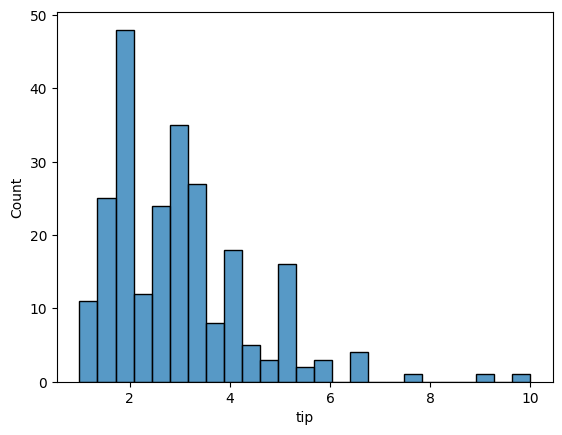
# more advanced visualization
# variable binning

import plotly.express as px

fig = px.histogram(tips, x="tip")
fig.update_layout(
    sliders=[{
        "active": 25,
        "currentvalue": {"prefix": "Number of bins: "},
        "pad": {"t": 50},
        "steps": [
            {
                "label": str(b),
                "method": "restyle",
                "args": [{"nbinsx": b}]
            }
            for b in range(5, 51)
        ]
    }]
)
fig.show()
px.scatter(tips, x='total_bill', y='tip')import plotly.figure_factory as ff
tips['percent'] = tips['tip'] / tips['total_bill'] * 100
fig = ff.create_distplot([tips['percent']], ["Percent Tips"])
fig.show()What would be a good estimate, , for percent tip?
Plotly related reading:
Loss Functions
To quantify how good an estimate is, we will use loss functions.
A loss function:
takes in an estimate and the points in our dataset, , and
outputs a single number, the loss, that measures how well fits the data
The choice of loss function affects the downstream analysis.
Let’s try something simple: taking the minimum difference, that is
Suppose , then:
tips['percent'] = tips['tip'] / tips['total_bill'] * 100
fig = ff.create_distplot([tips['percent']], ["Percent Tips"])
fig.add_vline(x=15, line_color = 'purple', line_dash = 'dash')
fig.show()Doesn’t capture much information about the values... just the smallest one
Let’s sum up the differences instead:
For tips, this would be :
With the negative values, the differences are cancelling out.
To avoid the differences cancelling, make the differences positive:
Use absolute value of the differences:
Square the differences:
Now we’re getting somewhere! We should normalize the number so we can compare it between different sample sizes.
Mean Absolute Error: Use average of absolute value of the differences:
Mean Squared Error: Use average of the square the differences:
Later we will learn loss functions for more complex models
Applying functions to Series
Pandas has a mechanism for applying a function to every element in a Series, called
applySimilar to aggregate functions, but slower and works on a single column of data.
names = baby['name']
names.apply(len)
0 4
1 4
2 4
3 9
4 6
..
1758725 5
1758726 6
1758727 5
1758728 5
1758729 9
Name: name, Length: 1758730, dtype: int64We can use built in functions... or we can write our own:
first_letter = lambda x : x[0]

names.apply(first_letter)
0 M
1 A
2 E
3 E
4 M
..
1758725 Z
1758726 Z
1758727 Z
1758728 Z
1758729 Z
Name: name, Length: 1758730, dtype: strSince apply returns a series, we can use it to create a new column in our dataframe.
baby['firsts'] = names.apply(first_letter)
baby.head()alternatively:
baby = baby.assign(firsts=names.apply(first_letter))
baby.head()Last thing, let’s step by step take the MSE for our tips dataframe
This will be our pipeline:
Calculate the
differencebetween each item and 15Calculate the
squaredvalue of each of the values indifferenceSum the
squaredrowDivide by the number of rows we have
n = 15
difference_fn = lambda x : x-15

tips = tips.assign(difference=tips['percent'].apply(difference_fn))
tips.head()squared_fn = lambda x : x**2
tips = tips.assign(squared=tips['difference'].apply(squared_fn))
tips.head()tips['squared'].sum() / tips['squared'].count()np.float64(38.31223773226083)Let’s combine this into one function:
def calculate_loss(df, theta, func = lambda x : x**2):
    difference_fn = lambda x : x-theta

    df = df.assign(difference=df['percent'].apply(difference_fn))
    df = df.assign(new=df['difference'].apply(func))
    return df['new'].sum() / df['new'].count()
calculate_loss(tips, 10)np.float64(74.11481945476554)import numpy as np
thetas = np.linspace(0, 32, 100)
losses = [calculate_loss(tips, theta) for theta in thetas]
px.line(x=thetas,y=losses)min_idx = np.argmin(losses)
print(f'Minimum Theta: {thetas[min_idx]}')
print(f'Minimum MSE: {losses[min_idx]}')Minimum Theta: 16.161616161616163
Minimum MSE: 37.15189913598053