Assignment 2
CSci 39542: Introduction to Data Science
Department of Computer Science, Hunter College, City University of New York
Spring 2026
To get full credit for a program, the file must include in the opening comment:
Your name, as it appears in your Gradescope registration.
The email you are using for Gradescope.
A list of any resources you used for the program. Include classmates and tutors that you worked with, along with any websites or tutorials that you used. If you used no resources (other than the class notes and textbooks), then you should include the line: “No resources used.”
For example, for the student, Thomas Hunter, the opening comment of his first program might be:
"""
Name:  Thomas Hunter
Email: thomas.hunter1870@hunter.cuny.edu
Resources:  Used python.org as a reminder of Python 3 print statements.
"""
and then followed by his Python program.
Good style accounts for 5% of the program grade. We are following the standard PEP 8 style guide for Python code. As part of the autograder scripts, your program is run through a static code analyser (aka a “linter”).
We are using Pylint which reports warnings and errors, including message codes, and then scores the code on a scale from 0 to 10. We multiply your percentage score by 2 (5% of the total) to determine the style grade. For example, if pylint scores your program 9, your style grade is (9/10) * 2 = 1.8.
See the Pylint website for tutorials, FAQ’s and standard warnings.
PEP 8 specifies that variable names should be at least 3 characters long, but it is long standing convention that DataFrames are named df. For the autograders, we have included df in the “good-names” that are accepted. This can be done locally with .pylintrc files or using the command-line option
pylint --good-names=df.Most IDE’s have linting available: for example, see pylint in PyCharm and Linting Python in VSCode.
Program 2: School Success
Due AoE, Thursday, 12 March.
Learning Objective: to build competency with Pandas for storing and cleaning data, use linear models, and introduce catergorical encoding. Available Libraries: Core Python 3.6+, Pandas.
Available Libraries: Core Python 3.6+ only.
Data Sources: NYC Open Data:
Sample Datasets:
2021
_DOE _High _School _Directory _SI .csv (Staten Island schools) 2020
_DOE _High _School _Directory _late _start .csv (schools with 9am start times in 2020)
The second program uses the same DOE school directory datasets as Program 1. Instead of using string and file I/O from core Python, this program uses Pandas to store and manipulate the data. The linear models built in this program are more complex than the simple constant models from the first program. This program follows a similar structure:
focuses on a data set, usually related to NYC,
cleans the data to be used for analysis,
builds a model, using some of the data,
evaluates how well the model at predicting, using the rest of the data, and
incorporates tests that the writen code perform correctly.
Programs are submitted via Gradescope (see general notes above for details) and can only use the libraries specified above (echoing the restrictions of technical screenings).
NYC OpenData
Much of NYC agency data is publicly available at NYC Open Data. We will focus on high schools maintained by the Department of Education.
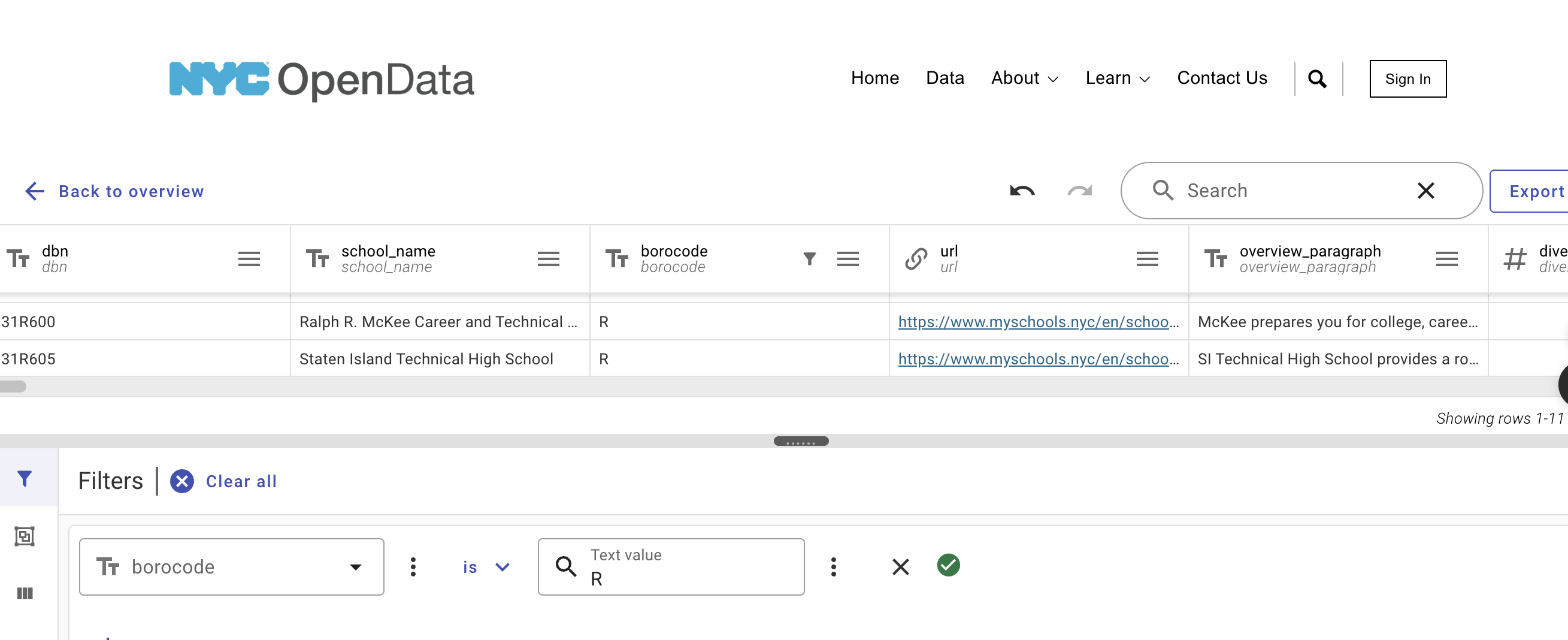
See Program 1 for the steps needed to download the datasets for testing.
The datasets have a large number (448!) columns:
dbn,school_name,borocode,url,overview_paragraph,diversity_in_admissions,diadetails,school_10th_seats,academicopportunities1,academicopportunities2,academicopportunities3,academicopportunities4,academicopportunities5,academicopportunities6,ell_programs,language_classes,advancedplacement_courses,diplomaendorsements,neighborhood,shared_space,campus_name,building_code,location,phone_number,fax_number,school_email,website,recruitment_website,sqr_website,subway,bus,gradespan,finalgrades,total_students,freshmanschedule,start_time,end_time,addtl_info1,extracurricular_activities,psal_sports_boys,psal_sports_girls,psal_sports_coed,school_sports,graduation_rate,pct_stu_safe,attendance_rate,pct_stu_enough_variety,college_career_rate,girls,boys,pbat,international,specialized,transfer,ptech,earlycollege,school_accessibility_description,program1,program2,program3,program4,program5,program6,program7,program8,program9,program10,program11,program12,interest1,interest2,interest3,interest4,interest5,interest6,interest7,interest8,interest9,interest10,interest11,interest12,prgdesc1,prgdesc2,prgdesc3,prgdesc4,prgdesc5,prgdesc6,prgdesc7,prgdesc8,prgdesc9,prgdesc10,prgdesc11,prgdesc12,common_audition1,common_audition2,common_audition3,common_audition4,common_audition5,common_audition6,common_audition7,common_audition8,common_audition9,common_audition10,common_audition11,common_audition12,auditioninformation1,auditioninformation2,auditioninformation3,auditioninformation4,auditioninformation5,auditioninformation6,auditioninformation7,auditioninformation8,auditioninformation9,auditioninformation10,auditioninformation11,auditioninformation12,seats9ge1,seats9ge2,seats9ge3,seats9ge4,seats9ge5,seats9ge6,seats9ge7,seats9ge8,seats9ge9,seats9ge10,seats9ge11,seats9ge12,grade9geapplicants1,grade9geapplicantsperseat1,grade9geapplicants2,grade9geapplicantsperseat2,grade9geapplicants3,grade9geapplicantsperseat3,grade9geapplicants4,grade9geapplicantsperseat4,grade9geapplicants5,grade9geapplicantsperseat5,grade9geapplicants6,grade9geapplicantsperseat6,grade9geapplicants7,grade9geapplicantsperseat7,grade9geapplicants8,grade9geapplicantsperseat8,grade9geapplicants9,grade9geapplicantsperseat9,grade9geapplicants10,grade9geapplicantsperseat10,grade9geapplicants11,grade9geapplicantsperseat11,grade9geapplicants12,grade9geapplicantsperseat12,grade9gefilledflag1,grade9gefilledflag2,grade9gefilledflag3,grade9gefilledflag4,grade9gefilledflag5,grade9gefilledflag6,grade9gefilledflag7,grade9gefilledflag8,grade9gefilledflag9,grade9gefilledflag10,grade9gefilledflag11,grade9gefilledflag12,seats9swd1,seats9swd2,seats9swd3,seats9swd4,seats9swd5,seats9swd6,seats9swd7,seats9swd8,seats9swd9,seats9swd10,seats9swd11,seats9swd12,grade9swdapplicants1,grade9swdapplicantsperseat1,grade9swdapplicants2,grade9swdapplicantsperseat2,grade9swdapplicants3,grade9swdapplicantsperseat3,grade9swdapplicants4,grade9swdapplicantsperseat4,grade9swdapplicants5,grade9swdapplicantsperseat5,grade9swdapplicants6,grade9swdapplicantsperseat6,grade9swdapplicants7,grade9swdapplicantsperseat7,grade9swdapplicants8,grade9swdapplicantsperseat8,grade9swdapplicants9,grade9swdapplicantsperseat9,grade9swdapplicants10,grade9swdapplicantsperseat10,grade9swdapplicants11,grade9swdapplicantsperseat11,grade9swdapplicants12,grade9swdapplicantsperseat12,grade9swdfilledflag1,grade9swdfilledflag2,grade9swdfilledflag3,grade9swdfilledflag4,grade9swdfilledflag5,grade9swdfilledflag6,grade9swdfilledflag7,grade9swdfilledflag8,grade9swdfilledflag9,grade9swdfilledflag10,grade9swdfilledflag11,grade9swdfilledflag12,seats1specialized,seats2specialized,seats3specialized,seats4specialized,seats5specialized,seats6specialized,applicants1specialized,applicants2specialized,applicants3specialized,applicants4specialized,applicants5specialized,applicants6specialized,appperseat1specialized,appperseat2specialized,appperseat3specialized,appperseat4specialized,appperseat5specialized,appperseat6specialized,seats101,seats102,seats103,seats104,seats105,seats106,seats107,seats108,seats109,seats1010,seats1011,seats1012,eligibility1,eligibility2,eligibility3,eligibility4,eligibility5,eligibility6,eligibility7,eligibility8,eligibility9,eligibility10,eligibility11,eligibility12,admissionspriority11,admissionspriority21,admissionspriority31,admissionspriority41,admissionspriority12,admissionspriority22,admissionspriority32,admissionspriority42,admissionspriority13,admissionspriority23,admissionspriority33,admissionspriority43,admissionspriority14,admissionspriority24,admissionspriority34,admissionspriority44,admissionspriority15,admissionspriority25,admissionspriority35,admissionspriority45,admissionspriority16,admissionspriority26,admissionspriority36,admissionspriority46,admissionspriority17,admissionspriority27,admissionspriority37,admissionspriority47,admissionspriority18,admissionspriority28,admissionspriority38,admissionspriority48,admissionspriority19,admissionspriority29,admissionspriority39,admissionspriority49,admissionspriority110,admissionspriority210,admissionspriority310,admissionspriority410,admissionspriority111,admissionspriority211,admissionspriority311,admissionspriority411,admissionspriority112,admissionspriority212,admissionspriority312,admissionspriority412,offer_rate1_1,offer_rate2_1,offer_rate3_1,offer_rate4_1,offer_rate1_2,offer_rate2_2,offer_rate3_2,offer_rate4_2,offer_rate1_3,offer_rate2_3,offer_rate3_3,offer_rate4_3,offer_rate1_4,offer_rate2_4,offer_rate3_4,offer_rate4_4,offer_rate1_5,offer_rate2_5,offer_rate3_5,offer_rate4_5,offer_rate1_6,offer_rate2_6,offer_rate3_6,offer_rate4_6,offer_rate1_7,offer_rate2_7,offer_rate3_7,offer_rate4_7,offer_rate1_8,offer_rate2_8,offer_rate3_8,offer_rate4_8,offer_rate1_9,offer_rate2_9,offer_rate3_9,offer_rate4_9,offer_rate1_10,offer_rate2_10,offer_rate3_10,offer_rate4_10,offer_rate1_11,offer_rate2_11,offer_rate3_11,offer_rate4_11,offer_rate1_12,offer_rate2_12,offer_rate3_12,offer_rate4_12,requirement_1_1,requirement_2_1,requirement_3_1,requirement_4_1,requirement_5_1,requirement_1_2,requirement_2_2,requirement_3_2,requirement_4_2,requirement_5_2,requirement_1_3,requirement_2_3,requirement_3_3,requirement_4_3,requirement_5_3,requirement_1_4,requirement_2_4,requirement_3_4,requirement_4_4,requirement_5_4,requirement_1_5,requirement_2_5,requirement_3_5,requirement_4_5,requirement_5_5,requirement_1_6,requirement_2_6,requirement_3_6,requirement_4_6,requirement_5_6,requirement_1_7,requirement_2_7,requirement_3_7,requirement_4_7,requirement_5_7,requirement_1_8,requirement_2_8,requirement_3_8,requirement_4_8,requirement_5_8,requirement_1_9,requirement_2_9,requirement_3_9,requirement_4_9,requirement_5_9,requirement_1_10,requirement_2_10,requirement_3_10,requirement_4_10,requirement_5_10,requirement_1_11,requirement_2_11,requirement_3_11,requirement_4_11,requirement_5_11,requirement_1_12,requirement_2_12,requirement_3_12,requirement_4_12,requirement_5_12,code1,method1,code2,method2,code3,method3,code4,method4,code5,method5,code6,method6,code7,method7,code8,method8,code9,method9,code10,method10,code11,method11,code12,method12,primary_address_line_1,city,postcode,state_code,Borough,Latitude,Longitude,Community Board,Council District,Census Tract,BIN,BBL,NTAFor this assignment, we are going to focus on a subset of these columns, listed below.
Cleaning Data
Make sure you have downloaded some test data sets to your device. Start a .py file that contains your introductory comment (see General Notes above for format). The next step is to format the data for analysis. Add the following to your file, testing as you go:
import_data(file_name):This function takes as one input parameter:file_name: the name of a CSV file containing 2021 DOE High School Directory from OpenData NYC.
The data in the file is read into a dataframe, and
only the columns, in the order below:
dbn,school_name,NTA,graduation_rate,pct_stu_safe,attendance_rate,college_career_rate,language_classes,advancedplacement_courses,method1,overview_paragraphare kept (e.g. all others dropped).
Any rows with missing values for
graduation rateare dropped. The resulting DataFrame is returned.
impute_numeric_cols(df):This function takes two inputs:df: a DataFrame containing DOE High School from OpenData NYC.col: a column name in df that contains a list of items separated by commas.
Counts the number of items, separated by commas, in each entry of df[col].
Returns the resulting Series.
encode_categorical_col(col):This function takes one input parameter:col: a column of categorical data.
Takes a column of categorical data and uses categorical encoding to create a new DataFrame with k columns, where k is the number of different nomial values for the column. Your function should create k columns, one for each value. The columns should be sorted and the DataFrame restricted to the first k-1 columns returned. For example, if the column contains the languages offers:
Mandarin, French, Arabic, Spanish, then the resulting columns would be labeled with those languages and sorted:Arabic, French, Mandarin, Spanish.split_test_train(df, xes_col_names, y_col_name, frac=0.25, random_state=922):This function takes 5 input parameters:df: a DataFramey_col_name: the name of the column of the dependent variable.xes_col_names: a list of columns that contain the independent variables.frac: accepts a float between 0 and 1 and represents the proportion of the data set to use for training. This parameter has a default value of 0.25.random_state: Used as a seed to the randomization. This parameter has a default value of 922.
This function should:
Create a new DataFrame, df_test using panda’s sample function to create a test set with frac of the rows and random_state for the random seed.
Makes a copy of the DataFrame, df and call it df_train.
Drop the rows in df_test from df_train (e.g. df_train = df_train.drop(df_test.index))
Return df_train[xes_col_names],df_test[xes_col_names],df_train[y_col_name],df_test[y_col_name].
For example, starting with the Staten Island data set:
file_name = 'fall23/program02/2021_DOE_High_School_Directory_SI.csv'
df = import_data(file_name)
print(f'There are {len(df.columns)} columns:')
print(df.columns)
print('The dataframe is:')
print(df)
gives the output:
There are 11 columns:
Index(['dbn', 'school_name', 'NTA', 'graduation_rate', 'pct_stu_safe',
        'attendance_rate', 'college_career_rate', 'language_classes',
        'advancedplacement_courses', 'method1', 'overview_paragraph'],
        dtype='object')
The dataframe is:
        dbn                                        school_name  ...   method1                                 overview_paragraph
1   31R047          CSI High School for International Studies  ...      Open  Our challenging and academically demanding pro...
2   31R064        Gaynor McCown Expeditionary Learning School  ...  Ed. Opt.  McCown is a college preparatory school partner...
3   31R080                    Michael J. Petrides School, The  ...  Ed. Opt.  Petrides is a comprehensive college preparator...
4   31R440                               New Dorp High School  ...  Ed. Opt.  New Dorp High School is a comprehensive high s...
5   31R445                          Port Richmond High School  ...  Screened  Port Richmond High School is a comprehensive C...
6   31R450                                 Curtis High School  ...      Open  Curtis High School is a Community School whose...
7   31R455                            Tottenville High School  ...  Ed. Opt.  Tottenville High School has long been recogniz...
8   31R460                        Susan E. Wagner High School  ...  Screened  Susan E. Wagner High School consists of 16 uni...
9   31R600  Ralph R. McKee Career and Technical Education ...  ...  Ed. Opt.  McKee prepares you for college, career, and li...
10  31R605                Staten Island Technical High School  ...      Test  SI Technical High School provides a robust lib...

[10 rows x 11 columns]
There are several rows with missing values for the college_career_rate. We will fill those in (impute) with the median of the column:
df_late = impute_numeric_cols(df_late)
print(df_late[ ['dbn','pct_stu_safe','attendance_rate','college_career_rate'] ])
           dbn  pct_stu_safe  attendance_rate  college_career_rate
    0   01M696          0.92             0.95                0.920
    1   07X334          0.89             0.90                0.350
    2   02M543          0.92             0.84                0.750
    3   14K685          0.94             0.83                0.420
    4   02M546          0.80             0.90                0.780
    5   02M376          0.97             0.93                0.790
    6   19K404          0.87             0.86                0.740
    7   20K490          0.80             0.90                0.570
    9   27Q334          0.92             0.83                0.725
    10  30Q301          0.94             0.93                0.840
    11  28Q328          0.87             0.87                0.880
    12  14K561          0.94             0.89                0.760
    13  31R450          0.76             0.85                0.600
    14  02M298          0.89             0.87                0.650
    15  04M555          0.97             0.95                0.950
    16  10X353          0.95             0.88                0.690
    17  02M420          0.90             0.91                0.730
    18  10X351          0.83             0.76                0.390
    19  20K445          0.75             0.86                0.630
    20  21K337          0.90             0.90                0.460
    21  18K633          0.92             0.89                0.810
    22  23K514          0.88             0.82                0.370
    23  02M294          0.89             0.87                0.780
    24  30Q575          0.86             0.93                0.620
    26  28Q440          0.77             0.90                0.720
    27  24Q299          0.97             0.98                0.990
    28  16K765          0.87             0.72                0.725
    29  09X403          0.89             0.83                0.470
Using the compute_count_col twice, let’s add in counts for languages & AP classes:
df_late['language_count'] = compute_count_col(df_late,'language_classes')
df_late['ap_count'] = compute_count_col(df_late,'advancedplacement_courses')
print('High schools that have 9am or later start:')
print(df_late[ ['dbn','language_count','language_classes','ap_count','advancedplacement_courses'] ])
gives the output:
High schools that have 9am or later start:
    dbn  language_count                                   language_classes  ap_count                          advancedplacement_courses
0   01M696               5            French, Greek, Latin, Mandarin, Spanish         0                                                NaN
1   07X334               1                                             French         0                                                NaN
2   02M543               1                                            Spanish         2  AP English Literature and Composition, AP Unit...
3   14K685               1                                            Spanish         0                                                NaN
4   02M546               1                                            Spanish         6  AP Biology, AP Calculus AB, AP Computer Scienc...
5   02M376               1                                            Spanish         4  AP Calculus AB, AP English Language and Compos...
6   19K404               1                                            Spanish         5  AP Biology, AP Computer Science A, AP English ...
7   20K490               6  Arabic, French, Greek, Italian, Mandarin, Spanish        20  AP 2-D Art and Design, AP Biology, AP Calculus...
9   27Q334               1                                            Spanish         6  AP Biology, AP Computer Science Principles, AP...
10  30Q301               1                                             French         6  AP Calculus AB, AP Computer Science Principles...
11  28Q328               2                                    French, Spanish         5  AP Biology, AP Calculus AB, AP Chemistry, AP C...
12  14K561               2                    American Sign Language, Spanish         7  AP Calculus AB, AP English Language and Compos...
13  31R450               3                           French, Italian, Spanish        10  AP Calculus AB, AP Computer Science Principles...
14  02M298               1                                            Spanish         5  AP Biology, AP Calculus AB, AP English Languag...
15  04M555               1                                            Spanish         7  AP Calculus AB, AP Computer Science Principles...
16  10X353               4                  French, German, Japanese, Spanish         6  AP English Language and Composition, AP Englis...
17  02M420               1                                            Spanish        12  AP Art History, AP Biology, AP Calculus AB, AP...
18  10X351               2                                  Japanese, Spanish         1                                         AP Seminar
19  20K445               4                 Arabic, Italian, Mandarin, Spanish        22  AP Biology, AP Calculus AB, AP Calculus BC, AP...
20  21K337               2                                  Mandarin, Spanish         0                                                NaN
21  18K633               1                                            Spanish         6  AP Biology, AP English Literature and Composit...
22  23K514               2                                    French, Spanish         4  AP Chemistry, AP English Language and Composit...
23  02M294               2                                    French, Spanish         0                                                NaN
24  30Q575               2                                    French, Spanish        10  AP Calculus AB, AP Calculus BC, AP English Lan...
26  28Q440               7  American Sign Language, French, Hebrew, Italia...        19  AP Art History, AP Biology, AP Calculus AB, AP...
27  24Q299               3                           Latin, Mandarin, Spanish         0                                                NaN
28  16K765               1                                            Spanish         3  AP Biology, AP English Literature and Composit...
29  09X403               2                                    French, Spanish         3  AP Calculus AB, AP French Language and Culture...
Continuing our example, we can add columns for the languages available, using one hot encoding:
df_langs = encode_categorical_col(df_late['language_classes'])
print(df_late['language_classes'].head(5))
print(df_langs.head(5))
print('Number of schools for each language:')
print(df_langs.sum(axis=0))
gives the new DataFrame that we can use to count number of schools that offer each language:
0    French, Greek, Latin, Mandarin, Spanish
1                                     French
2                                    Spanish
3                                    Spanish
4                                    Spanish
Name: language_classes, dtype: object

   American Sign Language  Arabic  French  German  Greek  Hebrew  Italian  Japanese  Latin  Mandarin  Spanish
0                       0       0       1       0      1       0        0         0      1         1        1
1                       0       0       1       0      0       0        0         0      0         0        0
2                       0       0       0       0      0       0        0         0      0         0        1
3                       0       0       0       0      0       0        0         0      0         0        1
4                       0       0       0       0      0       0        0         0      0         0        1

Number of schools for each language:
American Sign Language     2
Arabic                     2
French                    12
German                     1
Greek                      2
Hebrew                     1
Italian                    4
Japanese                   3
Latin                      2
Mandarin                   6
Spanish                   28
dtype: int64
To validate our models, we will randomly split the dataset into training and testing sets:
xes_cols = ['language_count','ap_count','pct_stu_safe','attendance_rate','college_career_rate']
y_col = 'graduation_rate'
x_train, x_test, y_train, y_test = split_test_train(df_late,xes_cols,y_col)
print(f'The sizes of the sets are:')
print(f'x_train has {len(x_train)} rows.\tx_test has {len(x_test)} rows.')
print(f'y_train has {len(y_train)} rows.\ty_test has {len(y_test)} rows.')
gives the output:
x_train has 22 rows.    x_test has 8 rows.
y_train has 22 rows.    y_test has 8 rows.
Once you have written your function, test it locally on the small test files. When it works, upload to Gradescope. Given the size of the files that we evaluate your code, you will find it much faster to develop and test the code in your IDE than debugging and testing in Gradescope.
Linear Regression Model
Last program, we built constant models which predicts the same (constant) values for all inputs. For this program, we are building models that vary their output, based on the input. Our first models will be linear regression models where we find the line that best fits (using least square) the data. Chapter 15 sets a good foundation for this and includes many examples.
We will first implement the linear regression for a single independent (explanatory) variable and a dependent (outcome) variable using only Pandas (our next assigment we will use build more complex models and use packages that have implemented them).
compute_lin_reg(xes, yes):This function takes two inputs:xes: an iterables of numeric values representing the independent variableyes: an iterables of numeric values representing the dependent variable
The function computes the slope and y-intercept of the linear regression line, using ordinary least squares (see DS 8: Chapter 15 or DS 100: Chapter 15 for detailed explanation). The pseudocode for this:
Compute the standard deviation of the `xes` and `yes`. Call these `sd_x` and `sd_y`.
Compute the correlation, `r`, of the `xes` and `yes`.
Compute the slope, `theta_1`, as `theta_1 = r*sd_y/sd_x`.
Compute the y-intercept, `theta_0`, as `theta_0 = average(yes) - theta_1 * average(xes)`
Return `theta_0` and `theta_1`.
Continuing our example for the late start high schools:
coeff = {}
for col in xes_cols:
    coeff[col] = compute_lin_reg(x_train[col],y_train)
    print(f'for {col}, theta_0 = {coeff[col][0]} and theta_1 = {coeff[col][1]}')
gives the output:
Note that two entries have the same length.
for language_count, theta_0 = 0.8480569704034503 and theta_1 = 0.008590562417322539
for ap_count, theta_0 = 0.8461003017752102 and theta_1 = 0.0036611430972476005
for pct_stu_safe, theta_0 = 0.3139020169251634 and theta_1 = 0.6179008519044576
for attendance_rate, theta_0 = 0.05301553094638145 and theta_1 = 0.937016067877174
for college_career_rate, theta_0 = 0.5128147415423354 and theta_1 = 0.5026459501657516
late_len_counts = count_lengths(late_overviews)
print(f"The {sum(late_len_counts.values())} entries have lengths:")
print(late_len_counts)gives the output:
The 30 entries have lengths:
{38: 1, 634: 1, 528: 1, 743: 1, 748: 1, 385: 1, 753: 1, 27: 1, 684: 1, 512: 1, 680: 1, 477: 1, 722: 1, 741: 1, 106: 1, 739: 1, 732: 1, 700: 1, 750: 1, 551: 1, 733: 1, 399: 1, 22: 1, 679: 1, 723: 1, 31: 1, 73: 1, 710: 1, 655: 1, 616: 1}
We can similarly compute the number of sentences:
si_dots_counts = count_sentences(si_overviews)
print(f"The {sum(si_dots_counts.values())} entries have lengths:")
print(si_dots_counts)
late_dots_counts = count_sentences(late_overviews)
print(f"The {sum(late_dots_counts.values())} entries have lengths:")
print(late_dots_counts)
gives the output:
The 11 entries have lengths:
{4: 6, 7: 2, 3: 2, 5: 1}
The 30 entries have lengths:
{0: 5, 7: 2, 3: 3, 4: 11, 5: 3, 2: 1, 6: 5}
For these small examples, the overall lengths of the paragraphs were different, but the number of sentences were much more concentrated.
We can compute the means as well:
si_len_mean = compute_mean(si_len_counts)
si_dots_mean = compute_mean(si_dots_counts)
print(f"Staten Island high schools overviews had an average of {si_len_mean:.2f} \
characters in {si_dots_mean:.2f} sentences.")
gives the output:
Staten Island high schools overviews had an average of 658.73 characters in 4.45 sentences.Evaluating Our Model
The next part of program evaluates how well our constant models do at prediction. We will use a loss function, mean squared error, introduced in Lecture 1 and Section 4.2.
predict(xes, theta_0, theta_1): This function takes three inputs:xes: an iterables of numeric values representing the independent variabletheta_0: the y-intercept of the linear regression modeltheta_1: the slope of the linear regression model
The function returns the predicted values of the dependent variable,
xes, under the linear regression model with y-intercepttheta_0and slopetheta_1.mse_loss(y_actual,y_estimate): This function takes two inputs:y_actual: a Series containing numeric values.y_estimate: a Series containing numeric values.
The series are of the same length and contain numeric values only (all null and non-numeric values have been dropped). The function returns the mean square error loss function between y_actual and y_estimate (e.g. the mean of the squares of the differences).
Note: a variation of this function was part of an earlier homework (Program 1) as well as in the textbook (using numpy). This is slightly different from both, as it takes lists (instead of dictionaries) and does not use the numpy library. It is included here to be used as a default argument for the error computation function below.
rmse_loss(y_actual,y_estimate): This function takes two inputs:y_actual: a Series containing numeric values.y_estimate: a Series containing numeric values.
The series are of the same length and contain numeric values only (all null and non-numeric values have been dropped). The function returns the square root of the mean square error loss function between y_actual and y_estimate (e.g. the square root of the mean of the squares of the differences).
compute_error(y_actual,y_estimate,loss_fnc=mse_loss): This function takes three inputs:y_actual: a Series containing numeric values.y_estimate: a Series containing numeric values.loss_fnc: function that takes two numeric series as input parameters and returns a numeric value. It has a default value of mse_loss.
The series are of the same length and contain numeric values only (all null and non-numeric values have been dropped). The result of computing the loss_fnc on the inputs y_actual and y_estimate is returned.
Continuing our example of number of sentences in an overview:
coeff = {}
for col in xes_cols:
    coe = compute_lin_reg(x_train[col],y_train)
    coeff[col] = coe
    print(f'for {col}, theta_0 = {coe[0]} and theta_1 = {coe[1]}')
gives the output:
for language_count, theta_0 = 0.821969696969697 and theta_1 = 0.008721590909090911
for ap_count, theta_0 = 0.829236532747707 and theta_1 = 0.0021805968221160063
for pct_stu_safe, theta_0 = 0.3259265268281375 and theta_1 = 0.5869741569127364
for attendance_rate, theta_0 = -0.4082696527688132 and theta_1 = 1.4385568607202786
for college_career_rate, theta_0 = 0.4664578537197913 and theta_1 = 0.5575944180964911
Lets see which explanatory variable did best on the testing data:
predicts = {}
errors = {}
min_error = 1
best = ""
for col in xes_cols:
    predicts[col] = predict(x_test[col], coe[0], coe[1])
    errors[col] = compute_error(y_test,predicts[col])
    print(f'Error on test data for {col} is {errors[col]}.')
    if errors[col] < min_error:
        min_error = errors[col]
        best = col

print(f'Column {col} has lowest error ({min_error}).')
gives the output:
Error on test data for language_count is 1.4074577840833737.
Error on test data for ap_count is 21.589341577894185.
Error on test data for pct_stu_safe is 0.014732620032972344.
Error on test data for attendance_rate is 0.015958758340922953.
Error on test data for college_career_rate is 0.0016245415203027973.
Column college_career_rate has lowest error (0.0016245415203027973).
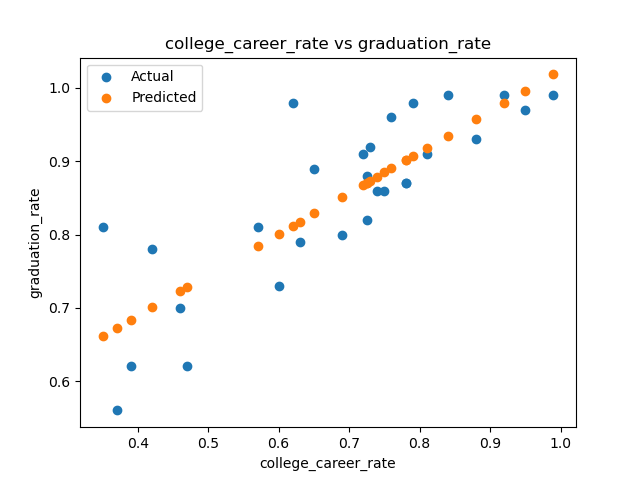
The smallest losses are for college_career_rate, so, let’s graph that to visualize the difference between the actual and predicted data. We first build a helper function to use for graphing.
import matplotlib.pyplot as plt
import seaborn as sns
def graph_data(df, col, coeff):
    """
    Function to graph the models
    """
    plt.scatter(df[col],df['graduation_rate'],label='Actual')
    predict_grad = predict(df_late[col],coeff[col][0],coeff[col][1])
    plt.scatter(df[col], predict_grad,label='Predicted')
    plt.title(f'{col} vs graduation_rate')
    plt.xlabel('graduation_rate')
    plt.ylabel(f'{col}')
    plt.legend()
    plt.show()

graph_data(df_late, 'college_career_rate',coeff)
which generates the plot:
Testing Code
Each programming assignment includes functions that test that your code works (a “test suite”). We will first build these in core Python, and in future assignments (Programs 3-6), will introduce standard testing packages.
Your program should include the functions below that test if your functions above perform correctly. Each of these functions takes a function as an argument. You can write them in any order, but we have placed them easiest to hardest below:
test_compute_count_col(compute_fnc=compute_count_col): This test function takes one input:compute_fnc: a function that takes two input parameters (a DataFrame and the name of a categorical column) and returns a Series. It has a default value ofcompute_count_col.
This is a test function, used to test whether the compute_fnc returning True if the compute_fnc performs correctly (e.g. computes the the count column) and False otherwise.
Hint: we will test your function with three different functions: the correct one, one that returns the column, and one that always returns a DataFrame with the 3 specified columns having the same entry (42) for all rows.
test_predict(predict_fnc=predict): This test function takes one input:predict_fnc: a function that takes three input parameters (a Series and two numerics) and returns a Series. It has a default value of predict.
This is a test function, used to test whether the predict_fnc returning True if the predict_fnc performs correctly (e.g. predicts the correct values) and False otherwise.
Hint: we will test your function with three different functions: the correct one, one that returns the Series unchanged, and one that always returns a Series with the same entry (42) for all rows.
test_mse_loss(loss_fnc=mse_loss): This test function takes one input:loss_fnc: a function that takes three input parameter (two Series) and returns a numeric. It has a default value of mse_loss.
This is a test function, used to test whether the loss_fnc returning True if the loss_fnc performs correctly (e.g. compute MSA) and False otherwise.
Hint: we will test your function with three different functions: the correct one, one that always uses mean absolute error as its loss function, and one that always returns 42.
Trying first on the correct function:
print(f'test_compute_count_col(compute_count_col) returns {test_compute_count_col(compute_count_col)}.')gives the output:
test_compute_count_col(compute_count_col) returns True.
Continuing our example with a function that returns the input columns values (instead of counts):
def same(df,col):
    return df[col]
print(f'test_compute_count_col(same) returns {test_compute_count_col(same)}.')
gives the output:
test_compute_count_col(same) returns False.
Notes
You should submit a file with only the standard comments at the top, the specified functions, and any helper functions you have written. The grading scripts will then import the file for testing.
If your file includes code outside of functions, either comment the code out before submitting or use a main function that is conditionally executed (see Think CS: Section 6.8 for details).